
Back in our usual venue, our team of volunteers will also be on hand to help you with clothing and textile repairs as well as small electrical goods.

Plus we will have a pay-as-you can green grocers and some home made treats to go with your cuppa, curtesy of:

Our end of Windows 10 support event is happening because this October, Microsoft will make millions of people’s computers obsolete by ending support for Windows 10.
Its successor, Windows 11, has unnecessarily strict requirements, meaning vast numbers of computers won’t officially be able to upgrade. This will leave many millions of functional computers and their users entirely unsupported by Microsoft. Microsoft’s advice? Find yourself a new computer.
You don’t have to do that!
Brighton Repair Café is joining repair organisations around the world in helping to keep “redundant” machines running, supported and out of landfill.
You’re invited to bring yours at our next event – or just come to find out more.
What we are doing to help at our upcoming event:
We can advise you on your options to keep your computer running well:
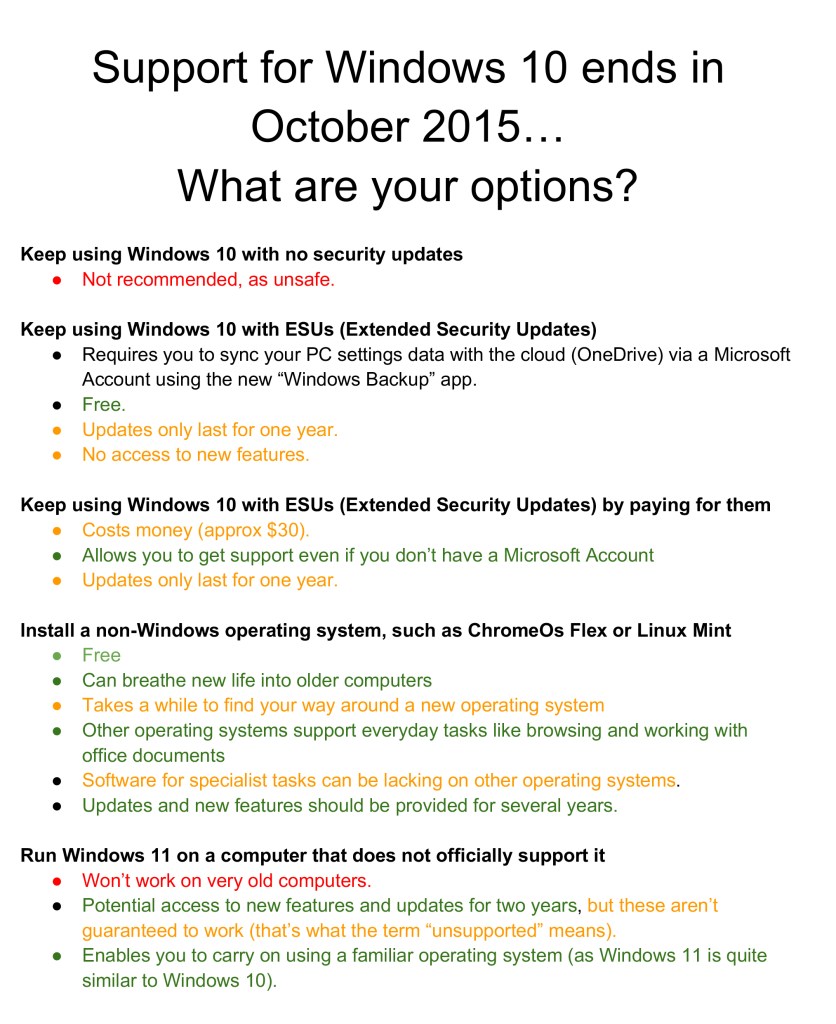
- You can change to a new operating system, or you may have the option of installing Windows 11 on a computer even though that computer is not officially supported by Microsoft.
- We will give you the opportunity to try out alternative operating systems on your
computer without installing them. - We will have Linux and ChromeOS ready, and there will also be a demonstration laptop if you don’t want to bring your own yet.
- If you want to change your operating system, we can help with that on the day – there’s no rush though, so you can take your time to think, prepare some more and come back again next month!
- We can also resurrect computers that you’ve put aside years ago due to earlier versions of Windows (Mac OS) ending.
Always back up all your important data before taking your computer in for repairs! We
won’t change your operating system unless you do so. We cannot back up your data at the event.
See you there… Let’s keep those computers working!
Running Windows 11 on an unsupported computer –
Your Questions Answered
What does “unsupported” mean?
To say that Windows 11 “isn’t supported” on a particular computer doesn’t necessarily mean that Windows 11 won’t work on it. What “unsupported” does mean, however, is that
Microsoft doesn’t guarantee that Windows 11 will work on it.
Is it legal to run Windows 11 on an unsupported computer?
Yes. Microsoft posted instructions as to how to do this on their website. They don’t
recommend that you go down this path, but don’t prohibit it either; they currently offer the
following disclaimer for those choosing to run Windows 11 on an unsupported computer:
Windows 11 on devices that don’t meet minimum system requirements – Microsoft Support
This PC doesn’t meet the minimum system requirements for running Windows 11 – these
requirements help ensure a more reliable and higher quality experience. Installing Windows
11 on this PC is not recommended and may result in compatibility issues. If you proceed
with installing Windows 11, your PC will no longer be supported and won’t be entitled to
receive updates. Damages to your PC due to lack of compatibility aren’t covered under the
manufacturer warranty. By selecting Accept, you are acknowledging that you read and
understand this statement.
Would I need to purchase an activation key for Windows 11?
If you have a properly-licensed version of Windows 10 on your computer and that same
computer can run Windows 11 in an unsupported state, you can upgrade for free; there’s no
need to purchase a new license. If you don’t have a Windows 10 or 11 licence, you can
install Windows 11 for testing purposes without purchasing a licence, although certain
features will stop working after 30 days. You’d then need to buy a licence to re-enable those features. Standalone Windows 11 licences are quite expensive; if you’re considering the expense of purchasing a standalone Windows 11 licence (£120), keep in mind that you
could purchase a cheap Mini PC together with a licensed version of Windows 11 for a similar amount.
What are the pros of running Windows 11 in an unsupported state?
● Extended life for older hardware: You can keep using a perfectly functional PC
beyond Windows 10’s support deadline in October 2025.
● Access to new features: Enjoy the latest Windows 11 interface, productivity tools,
and updates—at least initially.
● Performance can be decent particularly if your computer has a Solid State Drive
(SSDs) and enough RAM.
What are the cons of running Windows 11 in an unsupported state?
● No official support: Microsoft may block updates or features at any time, and you
won’t get help if something breaks. Unsupported systems might miss critical security
updates, leaving you vulnerable.
● Stability issues: Drivers and hardware may not function properly, leading to crashes
or glitches. (Although this sometimes happens even on computers that are officially
supported)
● No guarantee of future updates: Microsoft issues major updates to Windows 11 in
the second half of every year. On a supported machine, these updates are offered
automatically though a service called Windows Update. The current version of
Windows 11 was released in 2024 and is known as 24H2. Even if your computer
runs this with no problems, you might not be offered the newer version (25H2)
through Windows Update if your computer is unsupported. You can download it
yourself once it is released, and try to install it manually, but there’s no guarantee
that this will work. The current version of Windows 111 (24H2) will receive security
updates until October 13, 2026, although on an unsupported PC, it’s not guaranteed
that you will receive them or that the updates will work.
● Performance might not be good on old hardware. If you only use your computer
for simple tasks such as browsing the internet, this is less of a problem.
 Brighton Repair Café